How to track book series you own and find the books you are missing
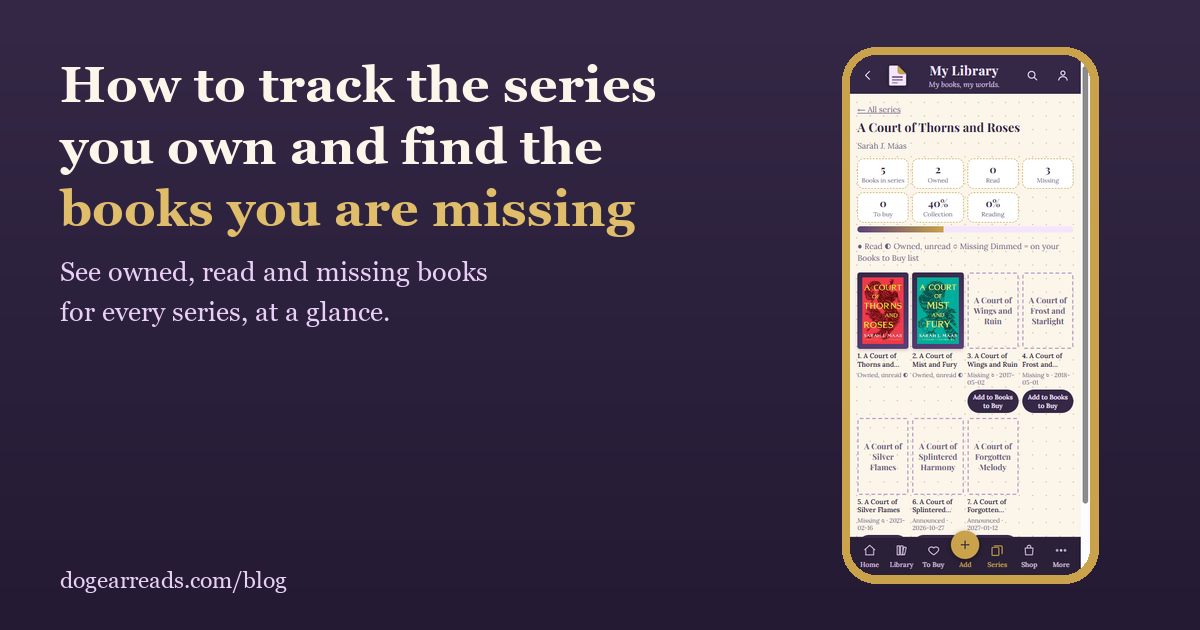
The short answer: to find the books you are missing from a series, compare your shelf against the series' full list. You can do that by hand with a list from the author's website, or let an app do it. Dog-Ear has verified full lists for more than 80 popular series, and shows each book as owned, read, or missing.
Every reader with a long shelf knows the feeling. You are in a bookstore, you pick up book four of a series, and you cannot remember whether you already own it. Series make this hard, because the numbering is rarely as simple as it looks.
Why series gaps are easy to miss
- Novellas sit between the big books. A Court of Frost and Starlight is a novella, but it is part of the A Court of Thorns and Roses reading order.
- Prequels are numbered differently. Some editions call a prequel book zero, others call it book four, and others leave it out of the number entirely.
- Titles change between countries. The first Harry Potter book is Philosopher's Stone in the UK and Sorcerer's Stone in the US.
- Box sets hide gaps. A set that says "books 1 to 3" can make you feel finished when the series keeps going.
- New books keep arriving. A series you finished last year may have a new release this month.
How to do it by hand
- Find a trustworthy full list. The author's own website is best, and Wikipedia usually has a table of every book in order.
- Write the list down, with the official number and title of each book.
- Check your shelf against it, and mark each book as owned, read, or missing.
- Note which missing books are novellas or companions, so you do not count them as gaps by mistake.
- Keep the list somewhere you will have it in a bookstore, such as your phone.
It works, but you have to repeat it for every series, and you have to remember to update it.
How to do it in Dog-Ear
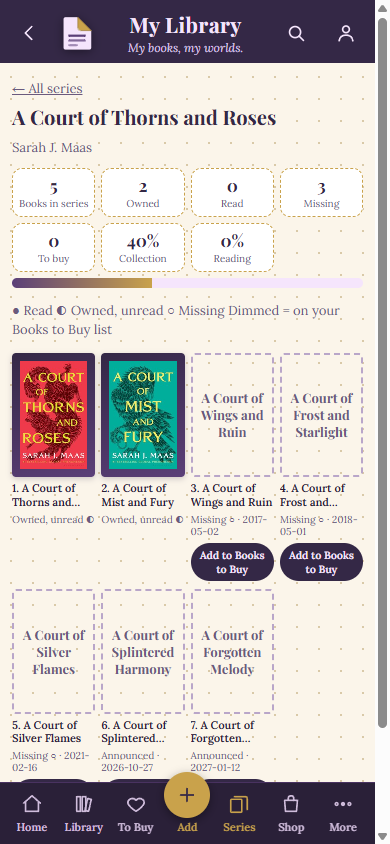
The Series page for A Court of Thorns and Roses in a test library: 2 owned, 3 missing, 2 announced.
- Add your books. Scan a barcode, or use Rapid Scan to scan a whole stack in a row. Dog-Ear groups them into series for you.
- Open the Series page. Every series shows how many books you own and how many you have read, with a progress bar.
- Tap a series. You see a tile for every book in order. Books you own show their cover, and missing ones appear as dashed tiles with their release date.
- Add missing books to Books to Buy. Tap a missing tile and it goes onto your wish list.
- Filter and sort. Choose "Has missing books" to see only the series with gaps, or sort by "Most missing".
- Let it pick your next read. In Pick My Next Book, "Continue a Series" and "Finish a Series" choose from books you already own.
Upcoming books that have been officially announced show up with their date and are not counted as missing. Companion books such as guides are listed but never counted against you, and novellas that are part of the official order do count.
What Dog-Ear does and does not know
This is the honest part. Dog-Ear shows missing books only for series where it has a verified full list, checked against sources such as Wikipedia, publisher pages and author sites. For any other series, it shows the books you own and have read, and it never guesses what is missing, because a wrong guess is worse than none. Manga is not included yet, since many readers own omnibus editions that bundle several volumes.
Series with a verified full list
Dog-Ear currently has verified lists for 85 series, with the number of main books in brackets:
- An Ember in the Ashes (4)
- Anne of Green Gables (8)
- Beautiful Bastard (10)
- Black Dagger Brotherhood (27)
- Briar U (4)
- The Bridge Kingdom (7)
- Bridgerton (8)
- The Broken Earth (3)
- Captive Hearts (2)
- Caraval (4)
- Chief Inspector Armand Gamache (20)
- The Chronicles of Narnia (7)
- Cormoran Strike (8)
- A Court of Thorns and Roses (5)
- Covenant (7)
- Crescent City (3)
- Crossfire (5)
- Dark / Carpathian (39)
- The Dark Elements (4)
- The Dark Tower (8)
- Divergent (3)
- Dollanganger (11)
- Dune (6)
- The Empyrean (3)
- Fablehaven (5)
- Fever (11)
- Flesh and Fire (4)
- Foundation (7)
- Gabriel's Inferno (4)
- Hannibal Lecter (4)
- Harry Potter (7)
- The Heroes of Olympus (5)
- The Hitchhiker's Guide to the Galaxy (6)
- The Hunger Games (5)
- The Illuminae Files (3)
- The Infernal Devices (3)
- Inheritance Cycle (5)
- It Ends with Us (2)
- Jack Reacher (30)
- Kate Daniels (16)
- Keeper of the Lost Cities (11)
- Kingdom of the Wicked (3)
- The Kingkiller Chronicle (2)
- Kings of Sin (6)
- The Kiss Quotient (3)
- Legacy of Orisha (3)
- Legendborn Cycle (3)
- The Lord of the Rings (4)
- The Lunar Chronicles (5)
- Lux (6)
- Maxton Hall (3)
- The Maze Runner (6)
- Millennium (8)
- Mistborn (8)
- Moonfall (2)
- The Mortal Instruments (6)
- The Murderbot Diaries (8)
- Off-Campus (5)
- Outlander (9)
- Percy Jackson and the Olympians (7)
- Plated Prisoner (6)
- Pretty Little Liars (16)
- The Princess Diaries (12)
- Red Queen (4)
- Red Rising (6)
- Serpent & Dove (3)
- Shadow and Bone (3)
- The Sisterhood of the Traveling Pants (5)
- Six of Crows (2)
- Skulduggery Pleasant (18)
- Slammed (3)
- A Song of Ice and Fire (5)
- Southern Vampire Mysteries (13)
- The Stormlight Archive (7)
- Throne of Glass (8)
- The Thursday Murder Club (5)
- Twilight (4)
- Twisted (4)
- Vampire Academy (6)
- The Vampire Diaries (13)
- The Wedding Date (6)
- The Wheel of Time (15)
- The Witcher (9)
- The Wolves of Ruin (2)
- Zodiac Academy (12)
Counts are the main books and officially numbered novellas as of October 7, 2026. Series with different numbering conventions, such as The Witcher and The Wheel of Time, follow the publisher's order. If a series you love is missing from this list, it still works in Dog-Ear for owned and read counts.
See what is missing from your shelves
Scan your books, open the Series page, and know before you reach the bookstore. $9, one time, no subscription.
Get Dog-Ear for $9Questions
How do I find out which books in a series I am missing?
Compare the books you own against the series' full list. By hand, that means checking a reliable list such as the author's website or Wikipedia and ticking off your shelf. In Dog-Ear, scan your books and open the Series page: for series with a full list on file, it shows every book as owned, read or missing.
Does Dog-Ear know the full list for every series?
No. Dog-Ear has verified full lists for more than 80 popular series, and shows missing books only for those. For any other series it shows the books you own and have read, and it never guesses what is missing.
What if my copy has a different title, like a UK edition?
Dog-Ear matches books by title, alternate titles and series number, and ignores series tags in brackets, so editions such as Philosopher's Stone and Sorcerer's Stone line up with the same slot.
Do novellas count as missing books?
Novellas that are officially part of the series order count. Companion books such as guides, cookbooks and short story collections are listed but are not counted as missing.
Related: Goodreads alternatives for people who own physical books and Book tracker apps with no subscription.